
Disclosure: This post contains affiliate links and we may receive a referral fee (at no extra cost to you) if you sign up or purchase products or services mentioned. As an Amazon Associate, I earn from qualifying purchases.
I love using the Empower dashboard to manage our investment portfolio. Not only is it worth its weight in gold, but the price of $0 is something worthwhile, too! They’re hoping you decide to use their investment services, but it’s not a requirement. I don’t use their services, but I have heard good things about them.
So, if you want an easy way to aggregate all your financial life into one dashboard with amazing retirement and investment tools, sign up for a free Empower account.
I use it religiously to manage our investments and our net worth. In fact, the net worth you see on my Net Worth page and in the sidebar on my site is taken directly from my Empower account every month.
Empower doesn’t blow me away with its cash flow and budgeting tools, though (that’s not their target audience anyway), so I use Quicken Simplifi for that. You can read more about that in my post, Why Quicken Simplifi Won Me Over.
But for investments, I’m completely satisfied with the Empower dashboard… well, almost completely.
I stumbled upon a problem regarding asset allocation I wanted to share, which I think everyone should bear in mind. It’s an easy problem to overcome, but if you don’t know about it, it has the potential to really bite you in the butt!
Empower’s asset allocation issue…
The recommended advice from almost every reputable financial planner is to keep your hands off your investment portfolio, except to rebalance it once or twice a year (target/age-based portfolios not included). You need to take the emotion out of investing and just let it do its job. I agree with that 100% – we have this human tendency to want to tinker too much and that can actually do more harm than good.
But the rebalancing part is still important because you want your portfolio to have an asset allocation that you’re comfortable with. Maybe when you’re younger and working, it’s 100% stocks. Later in life, maybe it shifts to something like 60% stocks and 40% bonds. It all depends on your comfort level and situation in life.
For me right now, it happens to be 70-75% stocks because I’m only 50 (not even halfway done with my 104-year-old goal! 😂), so I need more growth for my timeframe. Plus, my risk tolerance is a little higher because we have a bucket strategy in place to help tide us over for those times when the stock market craters.
The problem is that you have your desired asset allocation in place and then, over time, different classes of assets do better or worse than the others and throw your percentages out of whack. So if you have a preferred 60% stock, 40% bond asset allocation and the stock market keeps doing well, your percentages might end up being 70% stocks and 30% bonds. That throws off your goal, so you’ll likely need to sell some stocks and buy more bonds to get the percentages back on track.
If rebalancing and asset allocation aren’t something you’re well-versed in, don’t fret. But if most of your retirement money is in investments (again, target/age-based portfolios being an exception) rather than a pension or social security, you need to understand this. Here are a couple of articles to get you started:
- Investment Risk: Rebalance Your Way to Peace of Mind
- Portfolio Rebalancing: Get Your Asset Allocation in Line
For extra credit, you can read Opening the Books to Our Investment Portfolio to understand how our bucket strategy works. I thank my friend Fritz for introducing me to that whole concept. He’s got a fantastic article on that called How to Build A Retirement Paycheck From Your Investments that you should check out.
So now that that’s out of the way, let’s talk about my problematic realization. I rebalance my portfolio generally twice a year – once in the summer and once at the end of the year. This works out well enough for me. The goal is to do this as a scheduled day without thinking too much about what the stock market’s doing – just to keep the emotion out of it.
Pretty straightforward, right?
It’s even easier because the Empower dashboard makes it even easier. With two clicks, you can see your current asset allocation…
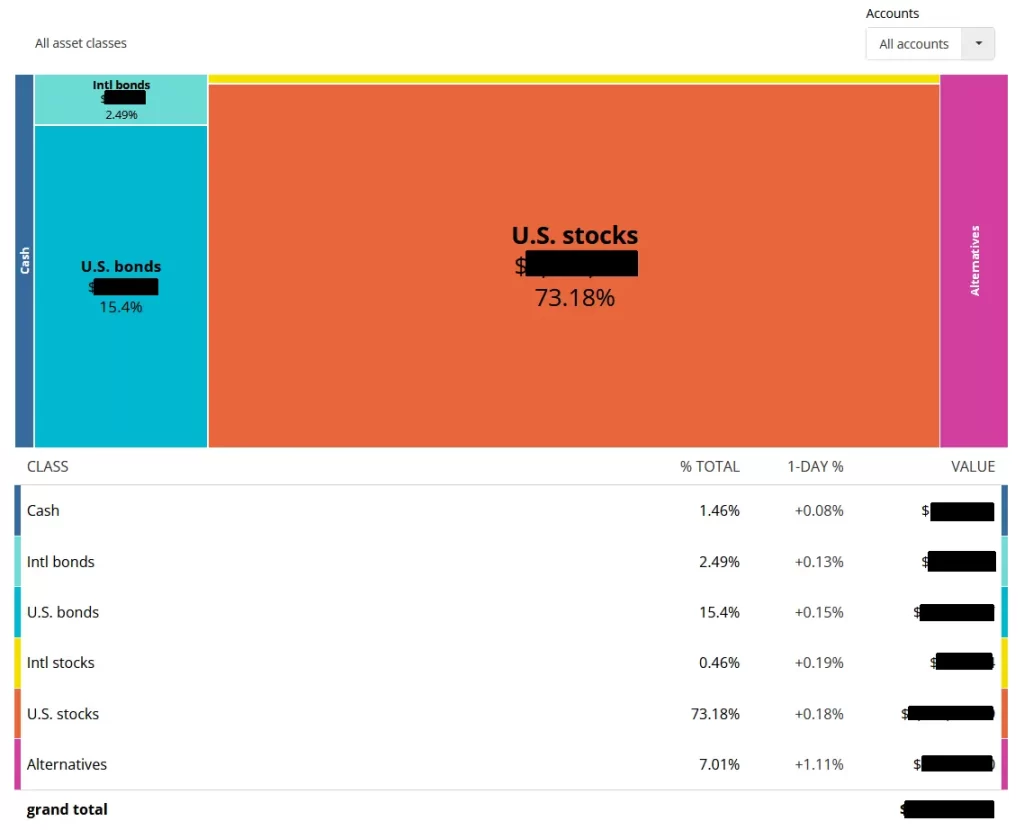
Perfect, right?
Well, almost.
It sure would be nice to have a way to know exactly what dollar amount you need to buy and sell in each class to rebalance in order to get your asset allocation where you want it, wouldn’t it?
Hmm, if only. Oh, wait – I can help with that! I created and use a spreadsheet that does exactly that. Readers on my mailing list have had access to the Portfolio Rebalancing Worksheet for several years now. You just input the same numbers from the Empower asset allocation screen into the spreadsheet and it’ll tell you whether you should even bother rebalancing, and if so, the amount to buy or sell in each class.

I’ve been using this spreadsheet to rebalance my portfolio twice a year for years now. You can get your own copy of this awesome spreadsheet (and a bunch of other cool ones!) as a welcome gift just for getting on my email list…
Now it’s perfect, right?
Well… maybe. This year presented an interesting twist that made me realize a big problem in how the asset allocation is handled with Empower.
As part of our FAFSA/SAI strategy for our daughter’s college in a couple of years, I pulled a lot of cash out of our portfolio in November last year… like a lot more cash than normal. We’re sitting on $150k+ that’s not being invested in the stock market. That’s all well and good because it should hopefully pay off later.
So, when I went to rebalance the next month (December), I looked at the asset allocation screen and input the numbers into the Portfolio Rebalancing Worksheet as usual, without thinking much about it. The spreadsheet told me I should rebalance, which made sense because the stock market’s been so good.
So I sold a bunch of shares of VTI and then bought another year’s worth of BulletShares for my bond ladder, plus some BND with the remainder.
Normally, that’s the end of the story. Nothing exciting – just doing my 6-month rebalancing.
But maybe a few days later, I realized a huge problem… Empower doesn’t count cash outside of your investments in your asset allocation.
Wait, what?
That $150k+ in cash didn’t count in my numbers or my calculations. So my asset allocation percentages were actually off quite a bit. I ended up selling a lot more stock than I needed from my portfolio and then bought more bond funds than needed.
Yikes. Here I am thinking my asset allocation was one way, but it was actually a lot more conservative than I wanted it to be… that’s a big problem.
Why Empower likely does it this way
I didn’t talk to Empower, so this is just my thinking, but I would bet that this goes back to what we talked about earlier: Empower is focused on investing. It does say “Portfolio” on the asset allocation screen, which implies an “investment” portfolio in my mind. There’s also a dropdown of accounts to include in the asset allocation and your only choices are your investment accounts…
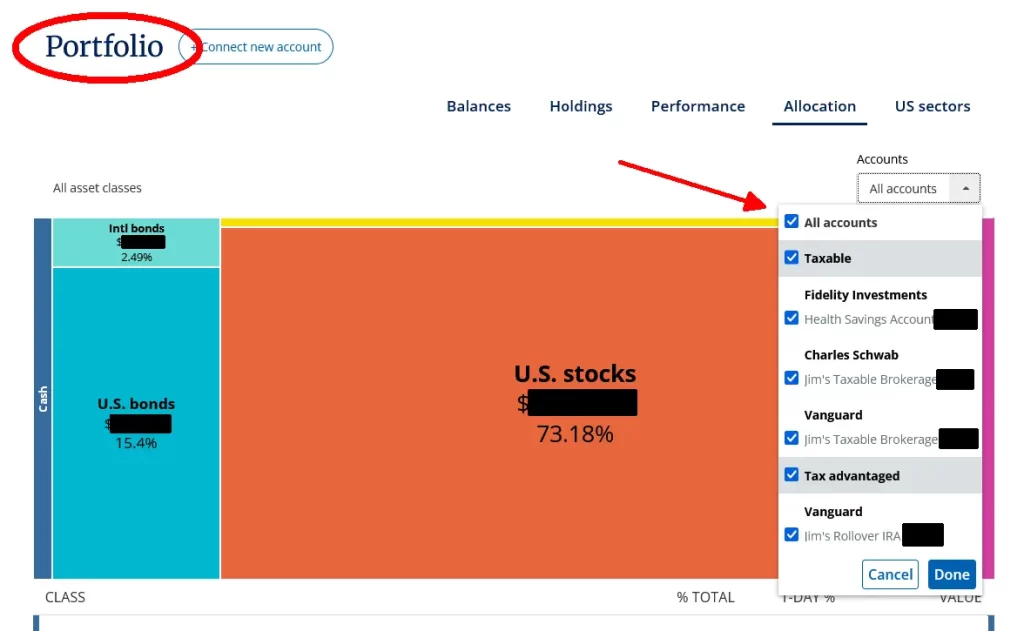
So, it’s not like Empower’s trying to pull the wool over anyone’s eyes. It’s all there plain as day, but if you don’t know it’s that way, it could cause you some problems, as it did in my case.
Maybe some folks only want to know the money specifically in their portfolio, but I definitely wouldn’t be in that camp. It would be nice to be able to toggle that on and off in the accounts list with all the other choices, but right now… not so much.
How I fixed that for me… and for you!
So what can you do?
Well, you can count on good old Jim at Route to Retire to come through for you!
That’s actually an easy fix since we utilize the Portfolio Rebalancing Worksheet anyway to see what needs to be done with rebalancing. Heck, one additional row fixed the problem (along with a few formula changes).
There’s now a place to enter Cash (outside of portfolio), and I changed the regular “Cash” place to be Cash (in portfolio).
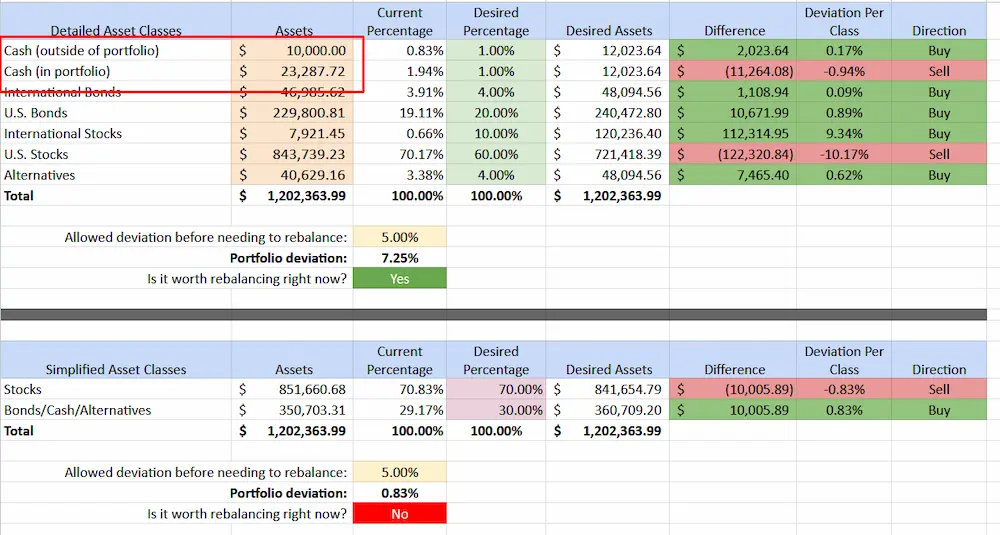
Assuming you want to include your cash outside of your portfolio, you can just enter that in using the cash total listed under Assets in the left sidebar of your accounts. Then input the other 6 amounts as usual to match what’s shown for the different asset classes and you’re done.
The Portfolio Rebalancing Worksheet then incorporates the non-portfolio cash in the calculations to give you a more accurate picture of your asset allocation. And more importantly, it’s included in telling you the amounts needed to rebalance your portfolio.
A big problem with an easy fix. You’re welcome. 😉
PS If you don’t care about your outside cash being included, just put in $0 and don’t worry about it, though I’m not sure why anyone wouldn’t want it included.
In my case, I got lucky. Even though the market had climbed significantly after I noticed the error on my part, it suddenly took a big drop for a day. I was able to sell some BND for a hair more than I bought it for and buy VTI for less than I had sold it for originally. And because this was in a retirement account, no wash rule applies.
So, we lived happily ever after while still learning from our mistakes. My allocation is back on track with no harm, no foul – I can’t complain about that!
That’s it, my friends – I hope you find this helpful. Even with this one little caveat, I still think Empower is a fantastic (and free!) way to get a handle on your investments and keep an eye on your net worth. Plus, the planning tools they provide are really impressive.
And one more time, you can get a copy of the Portfolio Rebalancing Worksheet (along with some other cool tools) just for signing up for my mailing list on the form earlier in the post, on the sidebar, or anywhere else I have it on the site.
Enjoy!
Plan well, take action, and live your best life!
Thanks for reading!!
— Jim
I envy your stay in Hawaii. I’m sure you’re enjoying the weather and sunshine.
I gave up on Empower some time ago. They never could aggregate all of my accounts. Since I’m such small peanuts, it’s simple for me to add up my totals to arrive at my worth on paper. That’s as far as I went with them, anyway. I just did the addition two days ago and I’m happy with my results.
I’m glad you are able to make use of this service.