

When you first start putting money into the stock market, your investment accounts may not seem to be that valuable. But over time, those accounts may very well be the lifeblood of your entire financial life.
That’s the case for us nowadays. We’ve been fortunate enough to build up a solid net worth over the years that now funds our early retirement.
That’s all well and good, but that makes it a little scarier that if one of those investment accounts were to be hacked, we could lose everything.
Sure, it’s possible that the financial institution would ensure we’re made whole again. However, did you ever read the terms? Depending on the circumstances and whether or not you’ve done your due diligence beforehand, the company could very likely just shrug its shoulders and say, “Sorry about your luck.”
I’ve come to realize that the idea of hoping for the best and planning for the worst is almost always the most ideal way to do things.
So, I’ve taken some steps to ensure my investment accounts are more bulletproof than most. I’d never say anything is 100%, but I do feel dramatically better after making these changes.
Be aware that the bulk of our wealth is at Vanguard and I also have my Health Savings Account (HSA) at Fidelity. These are the main ones that I made the changes with, but the principles should be the same, or very similar, for other financial institutions.
Set up a passkey (in addition to other login security)
I was going to leave out the “other login security” part of this just because I initially felt like everyone should already be on top of it. That said, I really don’t think most people are, so I’ll reiterate this real quick:
Set up a complex password
If your password for one of the most important accounts in your life is your dog’s name, you almost deserve to be hacked. Seriously, people, if you’re not stepping up your passwords by now, you’re just asking for it… and you will get hacked. It’s not a matter of if, it’s a matter of when.
Use a password manager. This should be security 101. I’m not thrilled with the password managers built into your internet browsers, but at least it’s something. Instead, I use Bitwarden as do my wife and daughter. It’s easy to use with extensions for all the major browsers, works great on the phone, it’s open source, and it’s free (though there is a premium version if you need it or just want to support the company).
My passwords for all my accounts (not just my investment accounts) are 16 characters long and full of fun symbols, letters, and numbers, and each might look something like this:
spYFcM!D7nN@6y
How do I remember a password like this? I don’t have to! That’s the whole point. The password manager can generate a password like this and then enter it automatically on the login site. Easy peasy!
Implement two-factor authentication (2FA) / multi-factor authentication (MFA)
I’m not going to delve into this too much (see my note at the bottom of this section for more info), but setting up two-factor authentication (2FA) can be one of the best ways to stop the bad guys. That’s when you log into your account and then need to enter a code from a text, email, or a 2FA app. Or some apps will just prompt you on your phone with a “is this you?” type of notification to answer.
Of those, the 2FA apps and the app notifications are the most secure, followed by email. The SMS 2FA (text message code) is not secure at all and definitely not recommended when other choices are available. There are also hardware choices like YubiKeys, which are even better, though that’s a little out of scope here and probably not something most readers here would use.
I’m currently using the free and open source app, Ente Auth, for 2FA. It works great and I like it a lot, but there are plenty of other good reputable apps out there as well if you find another you prefer.
Passkeys
Ok, onto the real point of this section. By now, most solid financial institutions should support passkeys because they’re easily one of the best ways to thwart hacking. These are so much better than passwords, and they’re essentially the technology that should put passwords to the grave eventually.
In a nutshell, a passkey is a simpler, more secure way to log in that replaces your password with the same face, fingerprint, or PIN you already use to unlock your phone or computer. Instead of you having to remember a password, your device talks directly to the website to prove it’s really you, making it nearly impossible for hackers to steal your login info.
They work with most operating systems and password managers and provide a nicer, more secure flow for logging into a site. I prefer using them with my password manager, Bitwarden, because they’re synced, so I can then use them from any browser that I have Bitwarden installed on (including my phone).
Read more about passkeys in the recommended guide in my important note at the end of this section.
Unfortunately, a lot of financial institutions don’t support passkeys yet, and that’s a real shame. However, where they’re supported, they should be used. And eventually, once users become more comfortable with them, you’ll start to see passwords disappear completely.
In this case, Vanguard does support passkeys. So, I created a passkey for logging into my investment accounts there and I’m a much happier camper. Now, when I log in with my username and password, I get prompted for my passkey, which opens in Bitwarden and I just need to click the entry there and I’m done.
To set this up for your own investment account at Vanguard (and to knock out other security tasks as well), you can log into your account and then go to your Security Profile page.
I’m disappointed that Fidelity and Schwab have not added support for passkeys yet. With your entire investment accounts being on the line, this is something these companies need to get on the ball with implementing. Until they do, please make sure you have a long, complex password and 2FA enabled for these financial institutions or any others you might be using.
IMPORTANT: If you’re not well-versed in digital security, I truly hope you read my post, Privacy and Security: The Essential Guide to Reclaiming Your Digital Life. It’s a great guide for getting your online security and privacy in check, if I do say so myself. And honestly, most of the steps should only take you a few minutes here and there to implement.
Remove your voice as a password
“At Vanguard, my voice is my password.”
That was something that was pushed from Vanguard I believe as far back as 2014. They had you say that a few times and then when you’d call in later, you would say it and it would authorize that it was you. Voice biometrics… pretty cool convenience… until it’s not.
Artificial Intelligence (AI) voice cloning has made voice imitation much easier. It’s so easy that with even just a small clip of someone’s voice, any amateur can use online software to clone your voice in just a few minutes.
That’s a big deal. That gives anyone easy access to leverage AI so they can make a phone call and act as though they’re you.
Although this might have been futuristic and cool years ago, it’s not anymore.
I called Vanguard and had this removed from my account probably a year or so ago. I did the same with Fidelity and Schwab.
There’s no doubt that you should do the same. AI fascinates me in both good and bad ways, but this is one of the bad ones. Don’t let voice cloning be the reason everything in your investment accounts disappears overnight.
Set up an enhanced security password
I don’t remember where I first heard about this, but Vanguard offers something called an “enhanced security password.” It’s not mentioned in the security section of their website, but it is a thing, and I like it a lot better than the voice biometrics.
This is simply a password that will be asked for by a rep when you call in on the phone before anything can be done on your account. This is not the same as your login password. And if the caller doesn’t know the password, nothing can be done on the account. This can stop an impostor right in their tracks.
If you forget your security password, there is a reset process… and it’s kind of a pain (which is a good thing!). It involves calling Vanguard and verifying your identity or using a notarized reset form that must be mailed in. A user in the Bogleheads forums said the only way to unlock it was a notarized form, with the reset turnaround taking about 5-7 business days.
The good news is that it won’t be a problem for me because that password is stored in the notes of my Vanguard entry in Bitwarden (my password manager)… and I’m sure that you’re in the same boat, right?
I like this because social engineering is a big threat. You might have all your defenses lined up to take care of hackers trying to break in online, but it could all crumble with one phone call from someone with just enough information about you. The enhanced security password puts another blocker in that path.
Set up ACATS Lock
I’m a loyal listener of the Clark Howard podcast. It’s at the top of my podcast list on my Resources and Recommendations page. His advice is the most sound and practical you’ll hear anywhere. He’s also very down-to-earth and easy to understand, even if you’re not a big personal finance nerd.
On a podcast episode a few months ago, Clark talked about ACATS (Automated Customer Account Transfer Service). I was unfamiliar with that term, but the gist is that it’s the system used by brokerage firms to move your money from one firm to another. If you decide to leave one of the banks that charge stupidly high fees for your investment accounts (that’s most of them) to go to somewhere where the air is a lot nicer (like Vanguard, Fidelity, or Schwab), ACATS is how your money would get moved from Company A to Company B.
Simple enough, right?
The problem Clark talked about is that ACATS wasn’t designed with good security. Because of that, criminals get your information, open a new shell investment account under your name, and then initiate an ACATS transfer of your money to their shell account. And just like that, all your hard-earned money is gone in an instant.
Here’s an article he wrote on the subject shortly after the podcast: Why You Need To Lock Your Brokerage Account Today.
His suggestion to protect your investment accounts is to set up an ACATS Lock. In other words, an unauthorized transfer can’t be done while this is in place. He compares that to doing a SIM lock on your phone (you’re already doing that, right?).
So I jumped right on that. I called Vanguard in December to make this happen. The rep had to do an additional security check (he sent me a text message to verify the SMS code), and then he submitted this to take effect for all my accounts. I did this for my wife’s and daughter’s investment accounts as well. The whole process took just a few minutes on the phone.
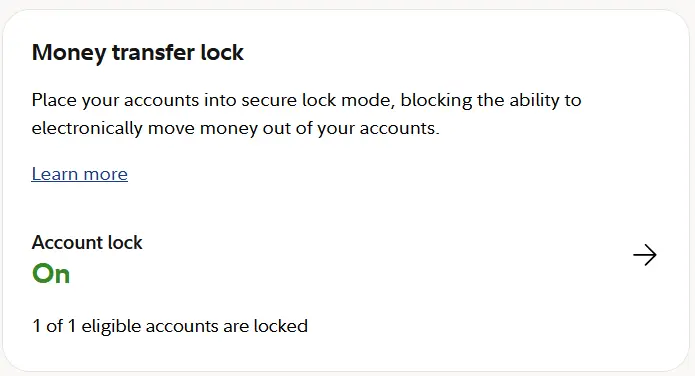
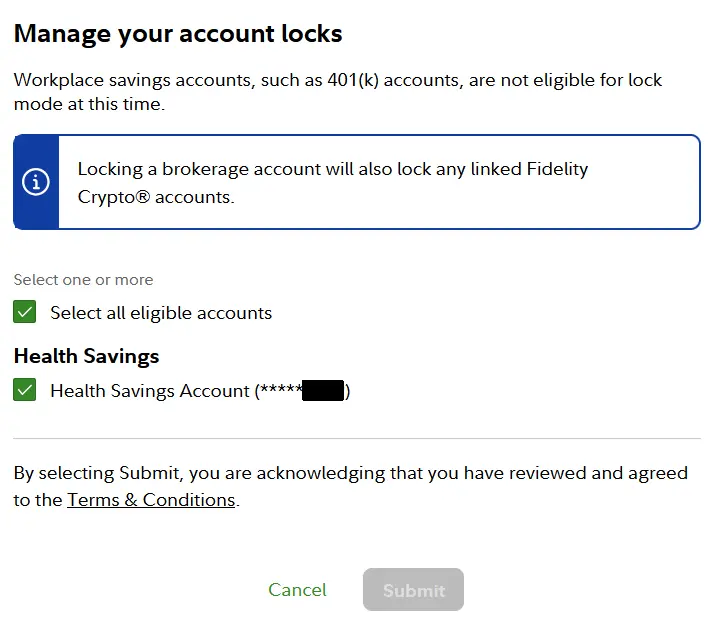
Handling this at Fidelity was even better since it could be done easily online. You just log into your account, go to “Profile”, and then to “Security”, and you can just toggle it on in the “Money transfer lock” section:
My understanding is that Schwab doesn’t have anything in place for this yet, but they’re working on it. For investment accounts elsewhere, you’ll want to contact your financial institution to find out if they have something in place for this and how to implement it.
Although the good guys have become much better at protecting your investment accounts, the bad guys have gotten better at trying to get into your investment accounts. And with AI, it’s like both sides are moving exponentially faster.
Remember, when it comes to security, there’s no foolproof way to stop someone from trying to get to your stuff.
Your objective, though, needs to be to put up the best roadblocks you can and hope that the attacker just moves on to easier prey instead.
With that said, I’m pretty happy with what I have in place. What about you?
Sign up here to hear more about money, travel, and financial freedom. And I’ll even throw in some cool freebies as a welcome gift, too!
Plan well, take action, and live your best life!
Thanks for reading!!
— Jim
Nice kick in the backside, needed periodically. I’ve finally started using NordVPN password manager but haven’t migrated everything to it yet. My question is what happens when I don’t renew Nord? There renewal is pricey, so I turn it off. Then I get good pricing offers. But it is annoying to do this every couple of years.(I know, 1st world…) If I do not renew am I locked out of accounts with a Nord password? My other securitg suggestion is to change your username so it is not your email. Just one extra step for a bad actor, but still…
Hey Kev – I learned the hard way more than once a long time ago to never go into something that’s going to take a lot of time without having a way to get out of it easily later. In the case of password managers, you want to make sure that you can export out your data later if you decide to go elsewhere so you can just import it into a new password manager.
The good news is that NordPass has a free version, so you can always continue to use it later if you want to continue without using whatever you’re currently paying for. And I have used NordPass before, but my understanding is that even in the free version, you can export out your accounts to a .csv file. That’s perfect because then you can always import that .csv into another password manager like Bitwarden or whatever if desired later.
Great call on the username not being your email! Such a smart move! A lot of companies are making users do this now anyway, but yeah, why give hackers 50% of the keys to the kingdom, right?
For me, I have a username convention that keeps it ambiguous, both so it’s not identifiable to me by itself, but also so it’s not the same as other sites. So I have different usernames on almost every site now. I made that change on each account when I moved everything to email aliases… not the ends most people will go to, but it made me feel better.
thanks for the information on ACATS. I have never heard of it. Fidelity added it without any notification to account holders and I suspect anyone with a 401k who is not at the point of withdrawals should be in default “on” for this lock. I have an HSA and unfortunately there is no way to limit the lock, ideally I could set an annual or monthly ceiling or even better, pre register the account I do transfers to and lock everything else. Hopefully they will add that option later, I asked… For passkeys, they are great, but often can be bypassed by username/password, so it is better, but still not as good as it should be. Biggest headache for me has been forcing the passkey on creation into my password manager, since every browser and especially windows fights to put them there instead. very easy to “lose” them, even if you identify the passkey manager as the primary passkey location in the browsers and OS. So easy enough for a techie, but awful for anyone less vigilent. As far as yubikeys, I learned about them, then bought 4 of them last year, only to find that samsung galaxy doesn’t really support them. they only allow using google as the passkey manager, the NFC is completely broken, and you can only access a single google account on the phone. The bugs have been known by samsung for over 2 years. and this is their flagship brand. Based on some other sources, it seems like the cheaper phones might actually work better. But buyer beware on yubikeys. They can be very secure for limited account use, but not ready for primetime until the rest of the world catches up.
I never thought about the HSA transfers that some people do regularly. Yeah, that would add the extra step in there. For now, it’s good though that Fidelity makes it easy and something you can toggle on or off without needing to call them… not perfect, but I guess it is what it is.
Yeah, passkeys are still having some growing pains while big tech all gets on the same page. Still worth it though. My understanding is that Microsoft is supposed to be coming out with a “fix” for how passkeys are handled so it doesn’t try to intercept password managers from handling them. I know exactly what you’re talking about and it’s pretty annoying for sure!
As far as the usernames and passwords go, this will be a slow transition and might actually take a few years, but you’ll start to see companies that have username/passwords and passkeys slowly start to phase out the username/password side of things. So you’re right, that fallback still leaves us with password being a target. But that’s why it’s still critical to use strong passwords and two-factor authentication wherever possible… along with the passkeys. We’ll all get there eventually! 🙂
I didn’t know that about Yubikeys. I never had one, but that’s just silly. With Samsung being such a big player, that shouldn’t happen. Ugh, sorry to hear that, Wayne.
Great comments on everything!!
I haven’t “studied” this blog post yet but it appears to have lots of useful information that I might need to follow and implement on our accounts. However, I wonder if the current set up of security is already good enough or whether I must take additional steps like learning about passkeys, authenticator apps, etc. Let me know, Jim, your thoughts because I’m not a geeky person so it would be helpful.
I must mention that I’ve been handling my spouse’s accounts all my life as he has no interest in financial side of things though I’m slowly pushing him to learn at least some.
Since we don’t leave our home for extended periods of time (yet) and I perform our financial duties on our house desktop computer I sometimes ask our investment accounts to remember our device. I wouldn’t do that when we travel and even we carry our own Chromebook or iPad along with us.
Anyway this is what I have so far…
I have created one gmail address along with a GV# for my spouse’s and my investment/bank accounts, our SS and treasury accounts (we have I-bonds there). I don’t use this gmail/GV# for credit card accounts or any other logins or emails outside the aforementioned accounts.
This Google account is Yubikey (3 or 4 yubikeys) protected and has a list of Google issued codes.
After I enter user name and password on our Vanguard, Fidelity, Schwab, SS, and Treasury logins, they send a code to either the GV# or Gmail. Thankfully GoogleVoice can be accessed on the PC so I don’t need to keep my phone next to me all the time to check GoogleVoice App.
If I want to access these accounts from a different device like an iPad, smartphone or new computer, I must have my Yubikey with me. If I tried to log into any of the accounts from that different device, SS, Schwab etc would send a code to the GV/Gmail, but in order to open and see the code I must authenticate with a physical Yubikey first.
I haven’t tested a situation when I don’t have a Yubikey in my possession and how easily Google would allow me to access my account with its issued emergency codes.
What do you think? Good enough or must I take extra steps to build more layers of security? My concern is that I might overprotect our accounts that being IT challenged I won’t be capable of accessing our accounts myself and that would be awful.
I know that people use password managers but I know that at least one of such companies were hacked in the recent past so I don’t want to use them.
A lot of people use authenticator apps, but can’t they be hacked remotely? Finanlly, smartphones are not safest devices. If one lost it and the hacker can get past the PIN, they could get to all the credit card apps, authenticator apps, everything, but maybe I’m thinking of a movie type probability when whoever tries to hack into our investments accounts they or their hired help come to get our phone. OTOH, it’s not that far fetched idea as one magazine printed last year a few stories of hired thugs coming to houses of people who have crypto accounts and they want keys to their accounts.:((
My BIGGEST concern is reading today that Anthropic’s Mythos is going to be a serious hacking machine and there will be numerous victims. I’m sure similar AI tools will follow. I wish we had strong goverment and laws to go after such AI companies and pay restitutions to such victims. How do you visualize security of your accounts, Jim, once Mythos and other AI destructive tools are unleashed? I’m concerned that we, responsible savers, are doomed.
Wow, that’s a lot to say, Raider! 😉
Here’s the deal in a nutshell – it’s impossible to protect yourself 100% in the digital world. Even if you do everything right, your SSN has probably already been leaked from the Equifax hack or some other big cyber attack.
So the best you can do is the best you can do. For instance, opting to get text messages for two-factor authentication codes when logging into a site is not great. SIM swapping and other problems make this the worst of the choices. That said, it’s still better than not doing any 2FA at all. But if you can, it’s better to choose email for 2FA. Better than that is a 2FA app (that’s where my limit is and what I do). And even better than that is a hardware key like a Yubikey.
What you have set up seems pretty good. SIM swapping is not the norm with voice-over IP (VOIP) numbers like Google Voice. I’m sure it could happen, but it’s not the norm.
As far as your concerns with password managers, I get the idea of being a little apprehensive. That said, the best password managers are what they call zero-knowledge. What that means in essence is that your password database is encrypted and the company that hosts that does not ever know your password to decrypt it. That means that even if the company were to be hacked and the bad guy gets your password database, it’s just a bunch of garbage to them because they don’t have your password and the company didn’t have that to be stolen either. That’s why a strong password with these is the way to go… plus it’s the only password you need to remember.
Some of the zero-knowledge password managers I’m aware of are Bitwarden, 1Password, NordPass, and Dashlane. Be aware that the downside is that if you forget your password, the company can’t help you.
As far as authenticator apps go, the majority of these only store the tokens on the app on your phone making it highly unlikely that someone would be able to get their hands on that. The tradeoff is that if your phone breaks, you’ve now lost all that. So, one option is to back up your tokens (encrypted) from the app. Another option is to use one that syncs between devices (though I still recommend periodic backups). I do the latter because for me the convenience is worth the small risk, but that’s a personal decision.
With the phones, yes, you need to be careful. The good news is that the average person can’t do the cool Mission Impossible type of stuff on your phone. In all reality, setting a PIN or fingerprint biometric on your phone is going to be one of those “good enough” type of things for the majority of people. Just make sure that any apps with sensitive information (banking, investing, wallets, authenticators, etc.) are all set to prompt for that PIN or fingerprint as well.
Most phones default to only letting your try to get into a phone a handful of times before it “tar pits” it with longer intervals before you can try again or even wiping the device (something you’d need to manually enable). If you lose your phone, both iPhone and Google have options to find it and remotely wipe it if necessary to help restore some confidence.
So, my advice is that you do what you can do and that’s it. Don’t overthink everything and just find the line that you’re comfortable with. For instance, I do a lot more protection with my stuff because I’m comfortable with it, but for my wife and daughter, I can only take it so far before it would cross the line with their comfort levels. And with my parents and mother-in-law, that’s a different generation and there’s no way I could get them anywhere close to where they should be before they would just throw their phones and computers out the window. The key is that something is better than nothing and I think you’re on the right track.
I hadn’t read about Mythos until your comment, but that’s really interesting. Yeah, AI is good and bad, but just like anything else, it’ll be a cat and mouse game. I mean that’s designed to find vulnerabilities so they can be fixed. If the bad guys get it, they’ll use it to find vulnerabilities to exploit. As things go, this will force companies to need to patch vulnerabilities faster, which this software is designed to find, right? So, it’s a plus and minus. I’m not worried about it. You stay with what you can control and worry about that. Everything else is not something worth stressing out over – life’s too short for that! 🙂